
Operations · · 13 min read
How to Automate Order Management for an e-commerce Brand
To automate order management, you connect every place an order is created to one system of record. Rules then handle capture, validation, routing, inventory updates and fulfillment, and people see only the exceptions. The software is the easy part. The hard part is the data behind it: accurate inventory, clean product records and supplier timing. If that data is wrong, automation just makes mistakes faster.
This guide is for operations leaders at brands selling across Shopify, Amazon and other channels, with multiple suppliers or warehouses, who have outgrown spreadsheets and inbox-driven order handling.
TL;DR
- Automating order management means one system captures orders from every channel, validates them, routes them, and updates inventory without manual re-keying.
- Automate routine decisions (validation, allocation, labels, status updates). Keep people on exceptions such as failed payments, stock mismatches, unusual quantities and supplier changes.
- Order automation is only as good as the inventory, product and supplier data behind it. Fix that layer first.
- Roll out in stages: map the process, automate one flow, run it beside the manual process, then widen the rules.
- Measure results with a small set of numbers you can pull from the system, and compare them to a baseline from before you started.
Table of Contents
- What it means to automate order management
- How an automated order workflow runs, step by step
- What you need to connect first
- Automating orders across Shopify, Amazon and other channels
- What to automate, and what should still get a human
- How to implement it without disrupting orders
- Measuring whether it works
- Perspective: why we build and run the system
- Where we can help
- Common mistakes to avoid
- FAQ
- Sources
What it means to automate order management
Order management is everything that happens between a customer (or a wholesale buyer) committing to buy and the order being delivered, paid for and, if needed, returned. In a manual setup, that means someone copies orders out of a storefront, checks stock in a spreadsheet, emails a warehouse and updates a status by hand.
Automation replaces each of those hand-offs with a rule or an integration. A trigger (an order is placed) starts a workflow, conditions decide which path the order takes, and actions happen without anyone touching them: reserve stock, create a pick ticket, print a label, notify the customer.
There are three levels, and most brands need all three:
- Task automation: one step, such as sending a confirmation or tagging a wholesale order.
- Workflow automation: a chain of steps, such as capture, validate, allocate, fulfill, invoice.
- Decision automation: the system chooses, for example which warehouse ships an order or whether a supplier’s changed date is acceptable.
The jump from the first level to the third is where brands save real time, and also where they get burned if the rules are loose.
How an automated order workflow runs, step by step
Here is the path a single order takes in a well-built setup.
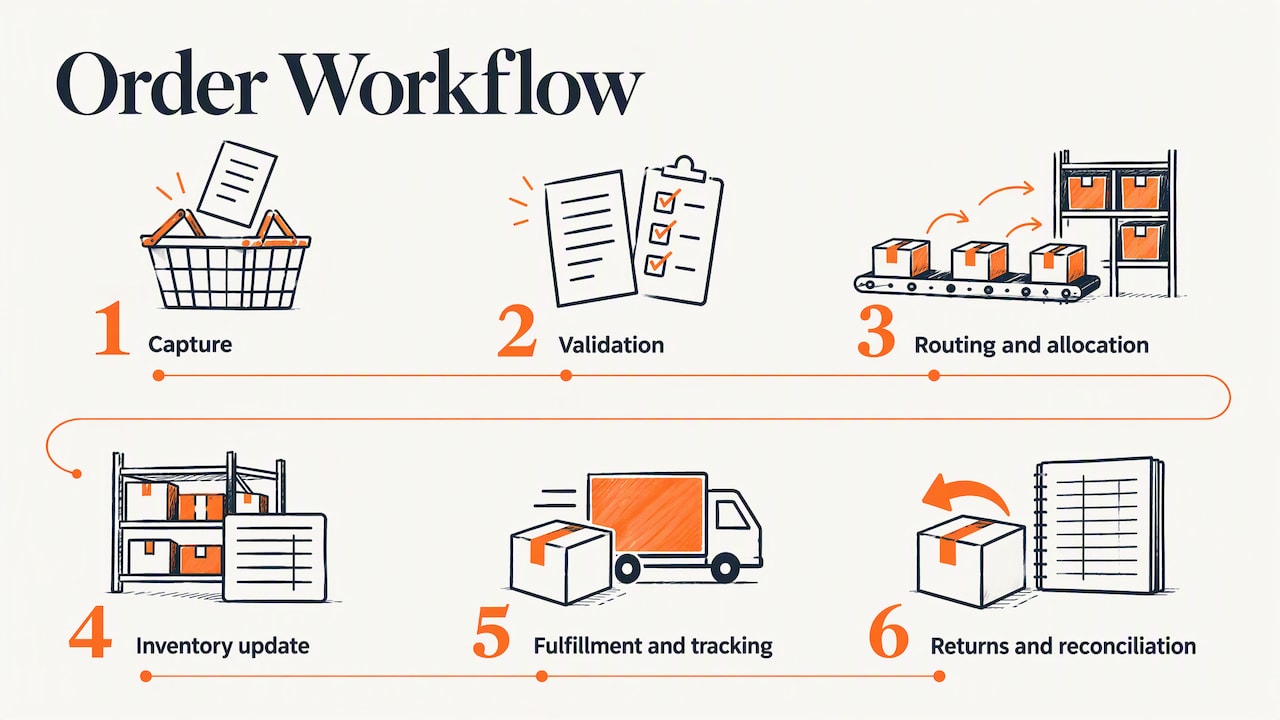
1. Capture
Orders arrive from your storefront, marketplaces, wholesale portal, email or EDI and land in one place in one format. The goal is that no one retypes an order. Every channel’s order ID, SKU, quantity, ship-to address and payment status is stored against the same product record.
2. Validation
The system checks the order before it commits anything: is the payment authorized, is the address deliverable, does the SKU exist and is it sellable, does the quantity make sense for this customer? Orders that pass go straight through. Orders that fail are held and flagged.
3. Routing and allocation
The system decides where the order ships from. Rules can use proximity, stock on hand by location, shipping speed promised, channel (for example, keeping marketplace-fulfilled stock separate from your own warehouse stock) or whether an item is made to order and needs production.
4. Inventory update
As soon as an order is accepted, stock is reserved. As it is picked, packed and shipped, on-hand and available quantities change. Every sales channel should see the new available number quickly, which is what prevents overselling.
5. Fulfillment and tracking
Pick lists, packing slips, labels and carrier bookings are generated. Tracking numbers flow back to the order and to the customer. Barcode scanning at the warehouse confirms that the right item went into the right box, which keeps the system’s numbers tied to physical reality.
6. Returns and reconciliation
The workflow does not end at delivery. Post-purchase automation can handle return eligibility, generate return labels, update inventory records when items are restocked, and process refunds within the original order system, as Stripe describes in its order management guide. Without this step, returned units sit in limbo and your available stock is understated or wrong.
What you need to connect first
Brands often buy an order tool and then discover it cannot see the information it needs. An automated order flow depends on five data sets being connected and trustworthy.
| Data set | Why order automation needs it | What breaks when it is wrong |
|---|---|---|
| Product and bill of materials records | Correct SKUs, variants, bundles and components | Bundles oversell because components are not decremented |
| Inventory by location | Allocation and availability | Overselling, wrong warehouse picks |
| Supplier and purchase order data | Inbound dates for backorders and promised ship dates | Customers promised stock that has not landed |
| Production plans | Made-to-order and in-house manufactured items | Orders accepted for goods that cannot be built in time |
| Finance and payments | Invoicing, payables, refunds, reconciliation | Revenue and cost mismatches at month end |
On the technical side, large order-management designs typically include an integration layer using APIs and event-driven patterns, an extract-transform-load (ETL) layer and a dedicated database layer, according to AWS’s guidance on distributed order management. You do not need to build that yourself, but it explains why a pile of point-to-point connectors tends to become fragile as you add channels and warehouses: each connector is another place for data to drift.
The practical test is simple. If you cannot answer “how many units of this SKU can I promise today, and where are they?” from one screen, fix that before you automate anything downstream. Our post on inventory turnover for e-commerce brands is a good companion if you are also deciding how much stock to hold.
Automating orders across Shopify, Amazon and other channels
Multi-channel selling is where manual order handling falls apart first, because the same units can be sold in several places at once. Four habits keep it under control.
One inventory truth. Pick a single system that owns available quantity. Channels read from it; they do not each keep their own count.
Channel allocation rules. Decide how much of each SKU is promised to each channel. A common approach is to hold a safety buffer on the fastest channel and release stock to slower channels as cover allows. Allocation should be reviewed as sales velocity changes, not set once.
Separate fulfillment pools. Units sitting in Amazon fulfillment centers are not available to your own warehouse, and the reverse is also true. Your system needs to track them as distinct locations, with inbound shipments tracked as their own state, so planners do not double count.
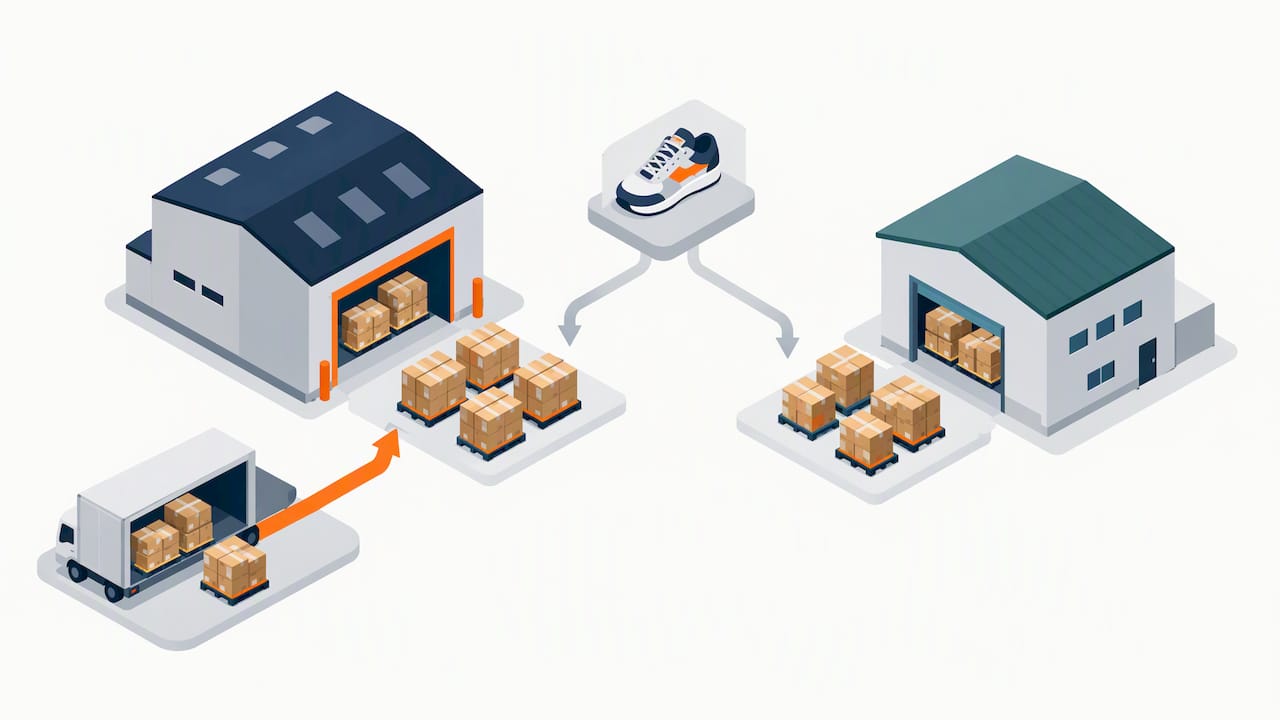
Fast, reliable sync. A sync that runs once a day is a slow-motion overselling machine on a hot product. Look for event-driven updates where an order or stock change pushes out immediately, and for alerts when a sync fails, because a silent failure is worse than a visible one.
Shopify’s built-in workflow tools can tag orders, send notifications and do simple routing inside the store. Once an order must touch a 3PL, an ERP or a marketplace, you need an integration layer or a system that natively holds all those connections.
What to automate, and what should still get a human
The safest way to think about it: automate what is repetitive, rule-based and reversible. Keep people on what is ambiguous, high-value or hard to undo.
| Automate | Keep a person in the loop |
|---|---|
| Order capture from every channel | Orders with failed or disputed payments |
| Address and SKU validation | Stock discrepancies between system and shelf |
| Allocation to the default warehouse | Unusually large quantities or new wholesale accounts |
| Label creation and carrier booking | Fraud-flagged orders |
| Customer status emails | Supplier date changes that affect promised ship dates |
| Standard returns within policy | Returns outside policy, damaged-in-transit disputes |
| Reorder alerts and draft purchase orders | Approving purchase orders above your spending limit |
The benefit of this split is that attention goes where it counts. Stripe frames a core advantage of automation as isolating exceptions: the system flags issues such as failed payments or stock discrepancies for human attention and handles the rest on its own.
A good rule for decision automation: let the system propose and a person approve until you have watched it be right many times. Then let it act alone within limits (a dollar cap, a quantity cap, a trusted-supplier list) and keep a log of every decision so you can audit it.
How to implement it without disrupting orders
Map the process as it really runs
Walk through the last 20 orders and write down every touch: who opened it, what they checked, which tool they used, how long it waited. Include the workarounds. The workarounds are where the rules hide.
Clean the data layer
Reconcile SKUs across channels, fix bundles and variants, set units of measure, and run a physical count against system quantities. Skipping this is the most common reason automation projects disappoint. An inventory audit before go-live gives you a trustworthy starting point.
Start with one flow
Pick the highest-volume, lowest-risk flow, usually standard direct-to-consumer orders shipping from one location. Automate capture through to shipment confirmation, and leave wholesale, backorders and returns for later phases.
Run in parallel
For a couple of weeks, let the system process orders while a person checks its output. Track every disagreement and decide whether the rule or the data was wrong.
Write the exception queue
Before go-live, define what lands in the exception queue, who owns it, and how fast it must be cleared. An exception queue nobody owns is just a new inbox.
Widen in stages
Add channels, locations, bundles, wholesale rules and returns one at a time. Review results at each stage before moving to the next.
Test the ugly cases
Test split shipments, partial stock, a bundle with one component out of stock, a cancelled order after pick, a duplicate order from a channel retry and a refund on a partly shipped order. These are the cases that happen on your busiest day.
Measuring whether it works
Take a baseline before you change anything, then track a short list monthly:
- Order touch rate: the share of orders a person handles by hand. This should fall steadily.
- Order-to-ship time: from order placed to carrier scan.
- Oversell and cancellation rate: orders cancelled because stock was not there.
- Inventory accuracy: system quantity against cycle-count quantity.
- Exception volume and age: how many orders are flagged and how long they wait.
- Time spent on order admin: hours per week your team spends on re-keying, chasing and reconciling.
Do not copy benchmark numbers from vendor pages into your plan. Your own baseline, taken before the change, is the only comparison that means anything for your catalog and channel mix.
Perspective: why we build and run the system
Most order automation projects we are asked to rescue did not fail because of the software. They failed because the software sat on top of unreliable inventory data and nobody owned the exceptions. A brand bought a connector, the sync drifted, and within a quarter the team was back in spreadsheets, only now with an expensive tool they did not trust.
That is why we do both halves. We build a custom ERP and MRP platform, ShipSpur, that holds products and bills of materials, suppliers, purchase orders, inventory, orders, production planning, replenishment, warehouse management and finance in one place. Our operations team then runs inventory planning, purchasing, logistics and reporting inside it. The tool catches what people can miss, and people catch what software cannot.
Our view on automation is conservative on purpose. Automate the routine hard, keep humans on money, quantity and supplier judgment, and write down every rule so you can change it later. A system that is right 95 percent of the time and tells you clearly about the other 5 percent beats one that is quietly wrong.
Muhammad Shammaz, Head of IT
Where we can help
If your orders touch several channels, suppliers and warehouses and your team is still stitching them together by hand, we can build the system around how your business works and run the day-to-day operation with you. You can buy the software, the operations service, or both. See ShipSpur ERP and TaskSpur for the software, and our supply chain and inventory services for the managed side.
Want to talk through your order flow? Contact our team, or see the e-commerce brands we run inventory for.
Common mistakes to avoid
- Automating a broken process. If the manual process is inconsistent, automation will encode the inconsistency. Standardize first.
- Trusting stock numbers you have not counted. Cycle count the fast movers before go-live and on a schedule afterward.
- Ignoring bundles and variants. Most overselling on multi-SKU catalogs traces back to components not being decremented.
- No owner for exceptions. Name a person and a response time.
- Switching everything on at once. Staged rollout makes problems traceable.
- Forgetting suppliers. Orders you can accept depend on inbound purchase orders. Automating the sales side without the purchasing side just moves the stockout later.
For more on how these pieces connect, browse the inventory and supply chain blog.
FAQ
What is the first thing to automate in order management?
Start with standard direct-to-consumer orders from one channel to one warehouse: capture, validation, stock reservation, label creation and tracking updates. It is high volume and low risk, so you gain time quickly and learn how your exceptions behave. Add wholesale, bundles and returns afterward.
Can automation prevent overselling across Shopify and Amazon?
It reduces it a lot, but only if one system owns available inventory and pushes changes to every channel quickly. Keep Amazon-held units and your own warehouse stock as separate locations. Keep a safety buffer on fast sellers, and set alerts for failed syncs.
Which order decisions should not be fully automated?
Keep people on failed or disputed payments, stock discrepancies, unusually large or first-time wholesale orders, fraud flags, supplier date changes and purchase orders above your spending limit. Let the system propose and a person approve until its decisions have proven reliable.
Do I need an ERP to automate order management?
Not always. A small catalog with one channel and one warehouse can run on store-level rules. Once you have multiple suppliers, warehouses, bundles or manufactured items, orders depend on purchasing, production and inventory data, and an ERP that holds them together is usually the cleaner answer.
How do I know automation is paying off?
Compare against your baseline: order touch rate, order-to-ship time, cancellations from stock-outs, inventory accuracy and weekly hours spent on order admin. If the first two fall and accuracy holds, the rules are working.
Sources
- Order Management Automation: A Business Guide, Stripe
- Guidance for Distributed Order Management on AWS